Simple Mood Tracker for Google Sheets: A Practical Tool for Daily Reflection
Tracking your mood might sound like a small habit, but it can offer surprising clarity about your energy, productivity, and overall well-being. The Simple Mood Tracker for Google Sheets is designed for people who want a lightweight, no-fuss way to log how they feel each day and see patterns emerge. Unlike complex journaling apps or dense spreadsheets, this template focuses on speed and visual clarity, making it easy to stick with the practice over weeks or months. If you have been looking for a way to check in with yourself without spending too much time setting things up, this tool deserves a close look.
At its core, the template is a digital download that works entirely inside Google Sheets. You need a free Google account, but nothing else to install. Once you open the template and make a copy, you get a ready-to-use mood tracker with dropdown menus, automatic color changes, and a graph that updates as you add data. The whole experience is built around reducing friction: you open the sheet, select your mood from a list, and let the formatting do the rest. For anyone juggling a busy schedule, that kind of simplicity matters.
What Makes the Simple Mood Tracker Worth Your Attention
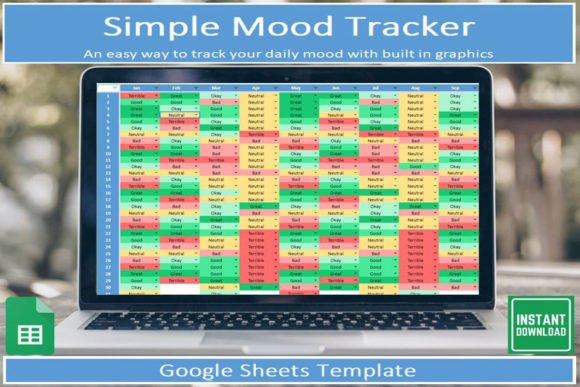
The key strength of this template lies in how it streamlines the tracking process. Many mood trackers require you to manually enter numbers, write notes, or interpret complex visualizations. Here, the dropdown lists handle categorization, and the cells automatically change color based on your selection. This means you can log your mood in a few seconds and immediately see a colored grid that reflects your emotional patterns across days or weeks.
Another notable feature is the built-in graph. Instead of exporting data or creating charts from scratch, you get an automatically updating visualization that shows trends over time. This is especially useful if you want to spot connections between your mood and other factors like work stress, sleep, or seasonal changes. The graph is not overly sophisticated, but it is clear and functional, which is exactly what you need for a quick check-in.
The template also includes a dedicated tab for a visual mood board. This is essentially a color-coded calendar view that gives you an at-a-glance summary of your emotional state for any given period. Combined with the graph, this dual view helps you move from isolated data points to a broader picture of your mental and emotional rhythms.
For people who are new to mood tracking, the included instructions explain what each element does and how to use it. This lowers the barrier to entry and ensures you do not waste time figuring out the mechanics. The instructions are straightforward and assume no prior experience with Google Sheets beyond basic navigation.
Visual Tracker Mood Board
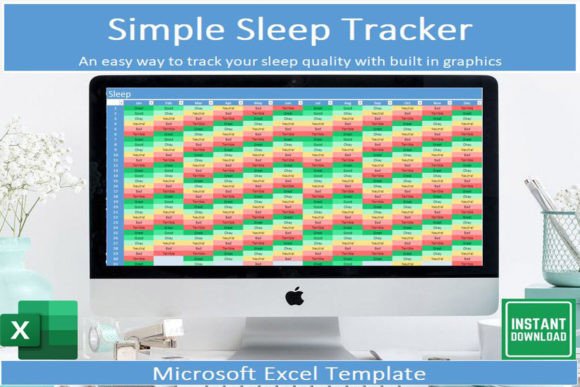
The mood board tab is perhaps the most immediately engaging part of the template. It displays a grid where each cell corresponds to a day, and the color of the cell reflects your chosen mood. Over time, this creates a pattern that is easy to read at a glance. You can see at once whether you have been feeling consistently positive, going through a rough patch, or experiencing a mix of ups and downs. This kind of visual feedback can be surprisingly motivating and can help you notice trends that you might otherwise miss.
Dropdown Lists and Automated Color Coding
Dropdown lists are the backbone of the template. You select your mood from a predefined set of options, and the sheet automatically applies a corresponding color to the cell. This eliminates the need for manual formatting and ensures consistency across entries. The dropdown approach also reduces the cognitive load of tracking: you are not staring at a blank cell wondering what to write. You simply pick an option, and the visual feedback appears instantly. For professionals and busy individuals, this efficiency is a major advantage.
Built-in Automatically Updating Graph
The graph sits on a separate tab and refreshes as you add new entries. It typically plots your mood over time, allowing you to see highs, lows, and plateaus. While it is not a replacement for deep analytics, it gives you a reliable snapshot of your emotional trajectory. If you are someone who likes data but does not have time to build charts, this feature saves you effort and keeps the focus on reflection rather than setup.
Instructions and Accessibility
The template comes with clear guidance on how to make a copy, where to enter your mood, and how to interpret the visual output. This is particularly helpful if you are not a frequent Google Sheets user. The instructions also note that you can use the free Google Sheets app on your mobile device, which makes it easy to log your mood on the go. Whether you are commuting, between meetings, or winding down at the end of the day, the mobile access means you never have to wait until you are at a computer.
Real-World Usability and Performance
In practice, the Simple Mood Tracker holds up well for daily use. The dropdown lists respond quickly, the color coding is consistent, and the graph updates without any lag. Because everything lives in Google Sheets, your data is automatically saved and synced across devices. This reliability is important for anyone who wants to build a consistent tracking habit without worrying about losing entries.
That said, the template is deliberately simple. It does not include fields for sleep, exercise, diet, or medication. The creator explicitly states that if you have a pre-existing condition or need something more comprehensive, a more detailed template will be available soon. This honesty is refreshing and helps set appropriate expectations. The current template is for people who want a quick, easy way to log mood without diving into a full health dashboard.
For freelancers, entrepreneurs, and remote workers, the simplicity can be a strength. Many professionals already use Google Sheets for planning and budgeting, so adding a mood tracker feels natural and does not require learning a new app. The mobile compatibility further lowers friction, letting you log your mood in moments of downtime. Over weeks of use, the accumulated data can reveal patterns that inform decisions about workload, breaks, or boundaries.
One observation from using similar tools is that the real value often appears after two to three weeks. At first, you might just be filling in colors. But once you have a month of data, the graph and mood board start telling a story. You might notice that your mood dips on certain days of the week or that you feel better after taking a midday walk. That kind of insight is actionable, and it comes from the simple act of consistent logging.
Who Benefits Most from This Template
The Simple Mood Tracker is best suited for adults aged 20 to 50 who lead busy lives and want a lightweight self-reflection tool. This includes professionals, entrepreneurs, marketers, creators, freelancers, bloggers, publishers, educators, small business owners, and serious hobbyists. If you already track other aspects of your life in spreadsheets, this template will fit naturally into your workflow.
It is also a good fit for people who are curious about mood tracking but do not want to commit to a complex app or a paid subscription. Because the template is digital and requires only a free Google account, the cost of entry is zero beyond the download. This makes it easy to try without pressure.
That said, if you need to track mood alongside specific triggers, medications, or clinical symptoms, you will likely want a more detailed tool. The upcoming comprehensive template from the same creator may address those needs. For now, this tracker serves as an excellent starting point for anyone who wants to build the habit of checking in with themselves daily.
Quality, Design, and Long-Term Value
The design of the template is clean and functional. The colors are pleasant without being distracting, and the layout is intuitive. The dropdown lists are well organized, and the graph presents data in a way that is easy to interpret. There is no clutter or unnecessary complexity, which aligns with the template's stated purpose of being quick and easy to use.
In terms of long-term value, the template holds up well as long as you continue to use it. Since it is a Google Sheet, you can keep adding entries indefinitely without performance issues. The color coding and graph scale automatically, so you never have to adjust settings. If you want to archive old data and start fresh, you can simply make a new copy.
One potential limitation is that the template does not include export or backup features beyond what Google Sheets already offers. You can download the sheet as an Excel file or PDF if needed, but there is no built-in archival system. For most users, this is not a problem, but it is worth noting if you plan to track mood for years and want a structured export format.
Practical Recommendations for Getting Started
If you decide to try the Simple Mood Tracker, here is a straightforward way to begin:
- Set up a free Google account if you do not already have one.
- Open the PDF that arrives after your download. It contains a link to the template along with instructions.
- Click the link, then make a copy of the template into your own Google Drive. This is essential because it gives you your own editable version.
- Familiarize yourself with the tabs: one for the visual mood board, one for the graph, and one with instructions.
- Start logging your mood each day using the dropdown lists. The color coding will happen automatically.
- Check the graph and mood board weekly to look for patterns. Adjust your routine or habits based on what you see.
For best results, set a recurring reminder on your phone or calendar to log your mood at a consistent time each day. Many people find that logging in the evening works well, as it allows you to reflect on the day as a whole. Others prefer a midday check-in. Choose a time that feels natural and stick with it.
Possible Limitations and Considerations
No tool is perfect, and the Simple Mood Tracker has a few boundaries worth mentioning. First, the dropdown options are predefined, so you cannot add custom moods without editing the underlying data validation. This is fine for general tracking, but if you prefer a very specific vocabulary for your emotional states, you may need to customize the list. The instructions do not cover this in detail, but it is possible with a basic understanding of Google Sheets.
Second, the template does not include space for notes or context. If you want to record why you felt a certain way, you would need to add your own column or use a separate tool. This keeps the tracker simple, but it also means you lose the narrative thread behind the numbers. For some users, this is a welcome constraint. For others, it may feel limiting.
Third, because the template relies on Google Sheets, you need internet access to make changes unless you enable offline mode in the Google Drive settings. Offline mode works well, but it requires a one-time setup. If you frequently travel or work in areas with unreliable connectivity, this is something to plan for.
Finally, as mentioned earlier, the template is not designed for clinical or therapeutic use. If you are managing a diagnosed mental health condition, a more robust tracking system is advisable. The upcoming comprehensive template may bridge that gap, but for now, this tool is best viewed as a general well-being companion rather than a clinical instrument.
In summary, the Simple Mood Tracker for Google Sheets delivers exactly what it promises: a straightforward, visual, and accessible way to track your mood over time. It is not overloaded with features, and that is precisely its strength. For busy adults who want a reliable method of self-reflection without the overhead of complex software, this template offers a practical and sustainable solution. If you are ready to start noticing the patterns in your emotional life, this might be the gentle push you need.