Order Tracker Spreadsheet Template for Streamlined Business
Running a small business or an online store means juggling many moving parts at once. Among the most important is knowing exactly where each order stands at any given moment. If you have ever found yourself digging through emails, scrolling through platform notifications, or trying to remember whether a customer’s item has shipped yet, you are not alone. A well-designed order tracker spreadsheet template can bring clarity to that chaos.
I personally run two online stores. One is an art store that sells physical prints and originals, and the other focuses on digital downloads. Keeping track of what goes where, which stage each order is in, and what still needs attention became overwhelming fast. That is why I built this Microsoft Excel Order Tracker template. It gives me a single place to see everything from the moment an order comes in to the moment it reaches the customer. And because it lives in Excel, I can access and update it on my mobile device using the free Microsoft Excel app.
This article walks through what the template includes, why different types of users find it valuable, and how you can use it to keep your order management running smoothly.
What the Order Tracker Spreadsheet Template Includes
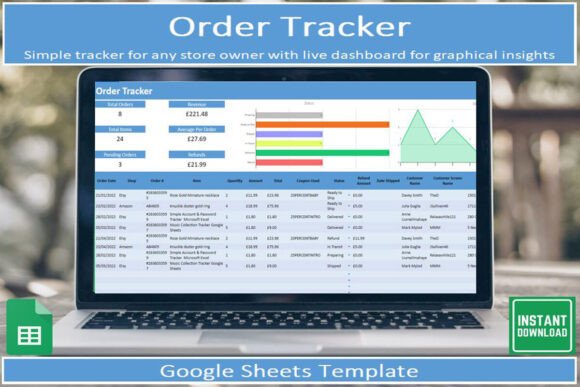
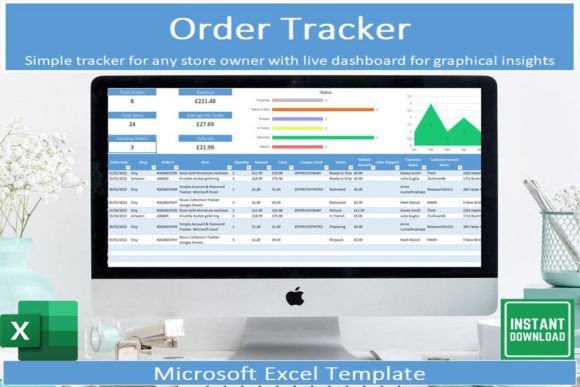
The template is a digital download designed for Microsoft Excel. It comes with instructions that explain every field and feature, so you do not need to be a spreadsheet expert to get started. As you enter data, built-in automatic graphical insights update in real time, giving you a visual snapshot of your order flow. There is a dedicated tab for tracking all orders, with columns that capture each stage from initial order placement through to delivery. You can filter and sort your data to focus on what matters most at any given moment, whether that is pending shipments, delayed deliveries, or orders waiting for payment confirmation.
Small Business Owners and Entrepreneurs
If you own a small business, your time is one of your most limited resources. Manually checking each order across multiple platforms eats into the hours you could spend on product development, marketing, or customer relationships. This template centralizes everything. You can see at a glance which orders need packing, which are waiting for courier pickup, and which have been delivered. The filtering options let you isolate orders by status, date range, or customer name, so you never lose track of a single sale.
For someone running a product-based business, the template also helps identify patterns. Which products sell most often? Which shipping carriers tend to be fastest? Over time, the data you enter becomes a record you can review to make smarter operational decisions.
Creators and Hobbyists Selling Online
Not everyone selling online runs a full-scale business. Maybe you are an artist, a maker, or someone who sells handmade items on the side. Your order volume may be smaller, but the need for organization is just as real. A single missed shipment can damage your reputation or lead to a refund request that eats into your profit margin.
This template works well for lower-volume sellers too. You can track every order in one place without needing complex inventory software. The graphical insights give you a satisfying visual of your progress, which can be motivating when you are balancing your side hustle alongside a day job or family commitments.
Freelancers and Service Providers
Freelancers often sell deliverables rather than physical goods, but the concept of an order still applies. You take on a client project, complete milestones, and deliver the final work. An order tracker can be adapted to track these stages: proposal sent, contract signed, work in progress, client review, delivery, payment received. While the template is built with product orders in mind, the columns and filtering options are flexible enough to accommodate service-based workflows.
Educators and Workshop Leaders
If you teach classes, sell course materials, or run workshops that require registration and follow-up, an order tracker helps you manage participant information. You can track who has paid, who has received access links, and who still needs follow-up materials. The visual insights can also show you which offerings are most popular, helping you decide what to promote more heavily in future.
Ease of Use
For someone new to spreadsheets, the idea of building an order tracker from scratch can feel intimidating. This template removes that barrier. The instructions are clear, and the fields are pre-labeled. You do not need to know formulas or macros to get value from it. Simply open the file, start filling in your orders, and let the automatic insights handle the rest.
Flexibility
Experienced spreadsheet users may want to customize the template to fit their exact workflow. The structure allows you to add columns, rename fields, or adjust the stages to match your specific process. Whether you ship using multiple carriers, offer local pickup, or have a multi-step fulfillment process, you can adapt the template without breaking its core functionality.
Cost and Value
Paid order management software can run into monthly fees that add up quickly, especially for a small or part-time operation. This template is a one-time digital download with no recurring costs. You get a professional tool without the subscription burden. For someone testing a new business idea or running a low-margin operation, that cost structure matters.
Presentation and Reporting
The built-in automatic graphical insights mean you can open the file and immediately see how your orders are distributed across stages. This is useful for personal review, but also for conversations with partners, investors, or team members. Instead of scrolling through a list, you can share a visual summary that communicates the state of your operations quickly.
Practical Examples for Different Reader Types
Example for a physical product seller: You run a small online store selling candles. You receive orders through your website and occasionally through a marketplace. Each day, you open the order tracker and filter by status “to pack.” You see exactly which items need preparation. As you pack each order, you update the status to “shipped” and enter the tracking number. Later, when a customer asks for an update, you can check the tracker in seconds.
Example for a digital seller: You sell downloadable planners on Etsy. Once a customer purchases, you need to confirm payment, send the download link, and mark the order as complete. You use the tracker to log each sale and update the status when you have sent the link. Over a month, the graphical insights show you which days of the week generate the most sales, helping you time your marketing efforts.
Example for a freelancer: You take on brand design projects. You adapt the tracker columns to show client name, project type, deposit paid, first draft delivered, revisions complete, final delivery, and full payment received. Filtering by “waiting on client feedback” shows you which projects need a follow-up email.
How to Know If This Template Matches Your Needs
Consider your current order volume. If you handle fewer than ten orders per month, a simple list may suffice, but the template still offers the benefit of visual insights and filtering that a basic list does not. If your volume is higher, the structure saves you from scrolling through scattered records.
Think about your comfort with Excel. If you are comfortable entering data into a spreadsheet and using basic filters, you will have no trouble with this template. If you have never used Excel before, the included instructions make it approachable. The free Microsoft Excel app also means you can enter and check orders on your phone, which is handy when you are away from your desk.
Reflect on whether you need reporting. If you want to see at a glance how your orders are progressing without manually counting rows, the automatic insights give you that clarity instantly.
Long-Term Usefulness
As your business grows, the template scales with you. You can archive older orders to keep the active tab manageable while retaining the ability to review historical data. The insights update as you add new entries, so your dashboard always reflects your current state. For someone building a business over months and years, having a consistent tracking method makes it easier to spot trends and adjust operations.
The template also serves as a backup. If your ecommerce platform experiences a glitch or you lose access to an account, your order records remain safely stored in your spreadsheet file. That peace of mind is valuable for any seller.
Final Thoughts
Staying on top of orders does not have to be complicated. Whether you sell physical art, digital downloads, handmade goods, or services, a simple tracker can reduce stress and help you deliver a better experience for your customers. This Order Tracker Spreadsheet Template gives you a ready-made structure that works on desktop and mobile, includes visual insights, and adapts to your unique workflow. Download it, open it in Excel, and start bringing order to your orders.