Infographic Style CV Resume A4 Template: A Strategic Tool for Career Positioning
In a competitive job market, your resume is not merely a list of past roles—it is a positioning document. The Infographic Style CV Resume A4 Template offers a structured yet visually compelling way to present your professional story. Unlike traditional text-heavy resumes, this template leverages design to communicate skills, achievements, and personal brand at a glance. But its true value lies not in aesthetics alone, but in how strategically you use it. When employed with clear goals, it becomes a tool for differentiation, clarity, and impact.
Why an Infographic Resume Template Matters for Your Goals
Every career decision rests on how well you convey your value. A standard chronological resume might suffice for internal promotions or highly formal industries, but for roles in creative fields, startups, marketing, entrepreneurship, or consulting, visual communication is a differentiator. The Infographic Style CV Resume A4 Template allows you to combine data visualization with narrative, making your qualifications more digestible and memorable. When used intentionally, it supports your goal of standing out without sacrificing professionalism.
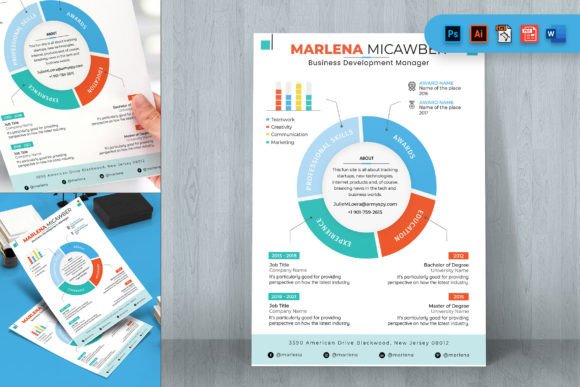
The template includes PSD, AI, EPS, XD, WORD, and PDF files, which means you can adapt it to your workflow. Whether you prefer Adobe tools or Microsoft Office, you have flexibility. But the strategic advantage comes from how you customize the content—not just the colors or icons. The organized layers in the AI and EPS files allow precise editing, while the WORD file ensures quick text updates for ATS parsing.
Aligning Design with Professional Positioning
Before opening the template, define your positioning. What single message do you want your resume to convey? Are you emphasizing leadership, technical expertise, creative problem-solving, or entrepreneurial initiative? The infographic style works best when you have a clear hierarchy of information. Use the layout to guide the reader's eye toward your most compelling achievements.
For example, if you are a marketer applying for a growth role, use the template's chart areas to show campaign metrics—like a bar graph comparing month-over-month traffic increases. If you are a project manager, use timelines to illustrate your ability to deliver on schedule. If you are a sales professional, use a pie chart to show revenue distribution across products. The template provides visual elements, but you must supply the strategic content. This approach ensures that every graphic reinforces your core narrative.
Entrepreneurs and Freelancers
Entrepreneurs often need to pitch themselves as much as their business. An infographic resume can serve as a one-page summary of your career trajectory and key ventures. Use it for investor meetings, networking events, or consulting proposals. The A4 format is standard in many regions, making it suitable for international opportunities. For freelancers, the template can double as a service portfolio, highlighting client results and skill competencies.
Creatives and Designers
Your resume is a portfolio piece in itself. Using the Infographic Style CV Resume A4 Template demonstrates not only your experience but also your design sensibility. Customize the vector layers to match your brand colors and typography. The organized layers in the AI and EPS files allow you to tweak every element without breaking the layout. You can also extract components like skill bars or progress charts for use in other brand materials, ensuring consistency.
Corporate Professionals in Dynamic Industries
Industries like tech, startup, and digital media value clarity over length. An infographic resume can condense your career into a single A4 page, highlighting key metrics and skills. This is particularly useful when applying for roles where recruiters scan resumes quickly. The template's 300 DPI and CMYK settings ensure print quality if you need physical copies for career fairs or interviews.
Educators and Researchers
For academics moving into industry or consulting, infographic resumes can bridge the gap between scholarly output and practical value. Use graphs to show publication impact, student outcomes, or grant amounts. The flexible page design allows you to add or remove sections as needed, making it easy to emphasize translational work or applied research.
When to Use an Infographic Resume vs. a Traditional Resume
This is a critical decision point. Infographic resumes are not always appropriate. If you are applying to a conservative law firm, government agency, or academic tenure track, a traditional format may be safer. However, for most modern roles—especially those involving innovation, communication, or people management—an infographic resume can enhance your application. The key is to match the format to the context.
Consider the company culture and job description. If the role requires creativity or data presentation, the template gives you an edge. If the hiring manager is likely to use applicant tracking systems (ATS), ensure your infographic resume includes text that the software can parse. The WORD file included in the template allows you to maintain text-based content for ATS compatibility while using the visual layout for human readers. Additionally, always export your final version to PDF to preserve formatting across devices.
Strategic Considerations Before Customizing
Do not rush into design mode. Start with planning. Open the 00_Read Me file to review font links and usage guidelines. The template relies on specific fonts for its look—using alternatives may disrupt readability. Download the recommended fonts to maintain consistency. Similarly, note that images and mock-ups in previews are not included; you will need your own photos or icons if required. This is not a limitation but an opportunity to personalize with authentic visuals.
List out your key accomplishments and group them by relevance to your target role. Then, map these to the template sections. The infographic style works best with 4–6 core data points or visual elements. Too many charts can clutter the resume. Prioritize quality over quantity. Decide on a color palette that reflects your industry—cool blues for finance, warm tones for creative fields, neutral grays for consulting. The template's layer organization makes color changes straightforward.
Potential Risks of Using an Infographic Resume Without Clear Goals
The most common mistake is treating the template as a decoration tool. A resume heavy on graphics but light on substance undermines your credibility. If the design overshadows your actual experience, recruiters may view it as gimmicky. Another risk is poor print or digital rendering—always test your final file on multiple devices. The template's organized layers help, but if you resize elements improperly, the layout may break.
Additionally, without a clear goal, you might include irrelevant visualizations. For example, a pie chart of your time spent on different skills can be confusing unless the proportions are meaningful. Every element should serve a purpose: to emphasize a strength, illustrate a result, or simplify a complex career story. A further risk is over-customization—changing every default element can lead to inconsistency. Stick to the template's core structure and only modify where it adds value.
Step-by-Step Approach to Intentional Use
- Define your objective. Are you applying for a specific job, pitching a service, or networking? Tailor the template accordingly. For example, a job application might emphasize relevant experience, while a networking sheet could highlight broad skills.
- Gather quantitative data. Metrics strengthen infographic resumes. Collect numbers from past roles: revenue growth, team size, project milestones, client satisfaction scores. These become the backbone of your visuals.
- Choose a focal point. The template likely has a prominent section for a summary or key skill. Place your strongest selling point there—this is what recruiters will see first.
- Customize colors and fonts sparingly. Stick to two or three colors that align with your personal brand or industry norms. Use the '00_Read Me' file for font details.
- Test readability. Show your draft to a colleague or mentor. Does the visual flow make sense? Is the text still legible when printed in grayscale? If not, adjust contrast.
- Export to PDF. Use the PDF file format for submissions. Double-check that all layers are flattened and fonts are embedded. The template's PDF option ensures compatibility.
- Update regularly. As your career evolves, revisit the template. The flexible design allows you to swap out charts or sections without starting from scratch. Keep a master version and create derivatives for each application.
Long-Term Value: Beyond a Single Resume
The Infographic Style CV Resume A4 Template is not a one-time tool. Because it is easy to customize, you can repurpose it for different contexts: a longer version for a portfolio, a condensed version for a LinkedIn profile, or a branded one-pager for a conference. The vector layers in the AI and EPS files mean you can extract elements like skill bars or timelines for use in other documents, maintaining visual consistency across your professional materials.
Over time, this approach builds a cohesive personal brand. When every touchpoint—resume, cover letter, website, social media—reflects the same design language, you reinforce your professional identity. The template serves as a foundation that you can adapt as your career grows. For entrepreneurs, this consistency can translate into higher trust with clients and investors. For employees, it simplifies job transitions by providing a ready-to-update framework.
Making Better Decisions with the Right Template
Ultimately, the value of the Infographic Style CV Resume A4 Template depends on your intentionality. It is a practical tool for professionals who need to communicate complex achievements quickly and visually. By treating it as a strategic asset rather than a cosmetic upgrade, you align your resume with your career goals. Use it when the context rewards clarity and creativity. Plan your content before opening the design files. And remember: the best resume is not the most colorful, but the most effective at telling your story. With disciplined customization, this template can become a cornerstone of your professional communication strategy.